PUBLICSIFT / TYPE IN PRACTICE
Chinese menu font pairing and a free A4 menu template
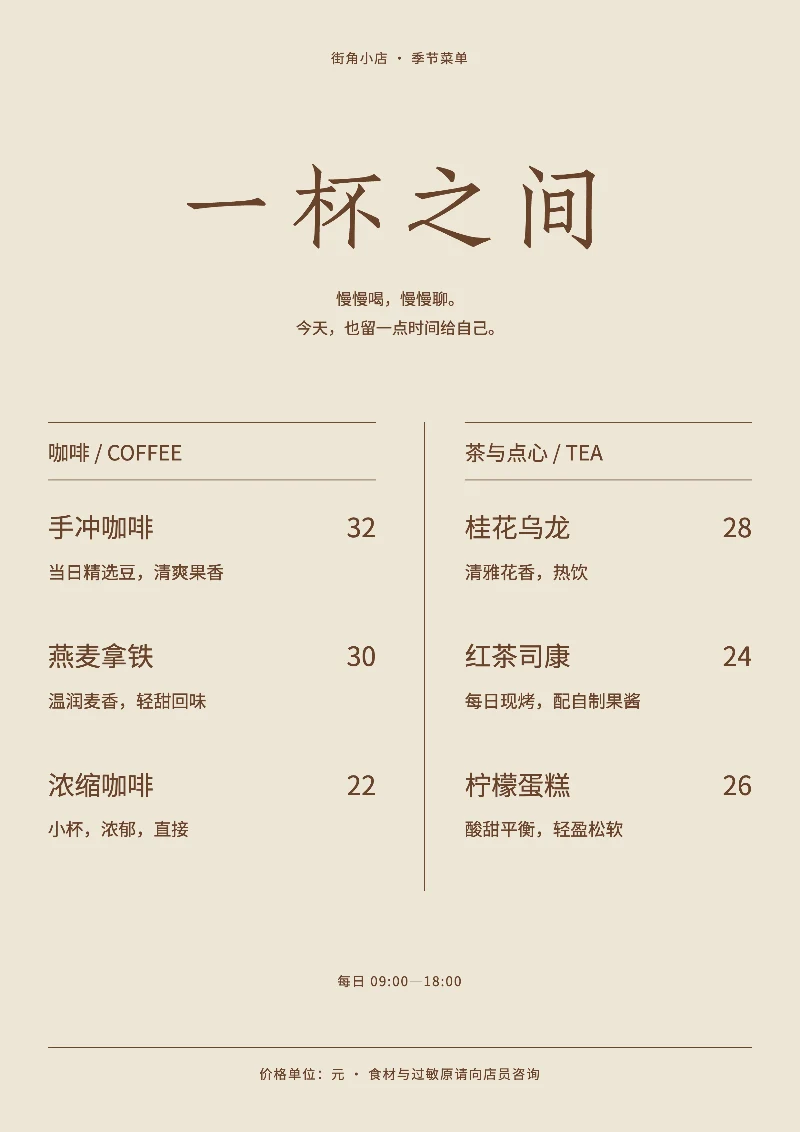
A useful menu helps people find a category, then read the dish and its price. This free A4 template has two menu columns, category headings, prices and short descriptions. It suits a small café, tea shop or a short seasonal menu.
Edit this free layout →No purchase required. The editor uses JavaScript.
Why try this pairing?
The example uses Zhuque Fangsong for the shop name and Noto Sans SC for dishes, descriptions and prices. The Fangsong heading gives the title character while the sans serif carries information people scan repeatedly. This is a design starting point to test with your own copy, not a universal brand recommendation.
From sample to your own design
- Open the free menu layout and replace the shop name, opening hours and introduction.
- Under Layout content, edit the two categories. Enter one dish per line as “name | price | description”. Prices are plain text; specify the currency yourself.
- Test the longest dish name, real prices and any uncommon Chinese characters first. Shorten descriptions if they exceed the fixed artboard.
- Export PNG, PDF or offline HTML. Before printing a batch, test one page at actual A4 size and inspect small text, prices and contrast.
What to check before exporting
- This is a fixed A4 composition, without ordering, inventory, calculations or a QR service. Split a large menu across separate designs; the editor does not paginate automatically.
- The sample is in simplified Chinese. Check actual font coverage for traditional Chinese, Japanese and uncommon characters. Similar appearance does not establish coverage.
- PDF is a flattened image with no selectable text. Keep offline HTML for further editing. Shorten copy or adjust type size when the fixed artboard overflows.
Font sources and licenses
- Zhuque Fangsong (technical preview) · TrionesType · SIL OFL 1.1
Publisher listing · Pinned source · Original license text - Noto Sans SC · Google · SIL OFL 1.1
Publisher listing · Pinned source · Original license text
Commercial use depends on each original license. Font redistribution, modification and reserved names have their own conditions. A finished design and a redistributed font file are different uses; retain the relevant license when sharing font files.
Try with your own text →