PUBLICSIFT / TYPE IN PRACTICE
Editorial font pairing: Cormorant Garamond and DM Sans
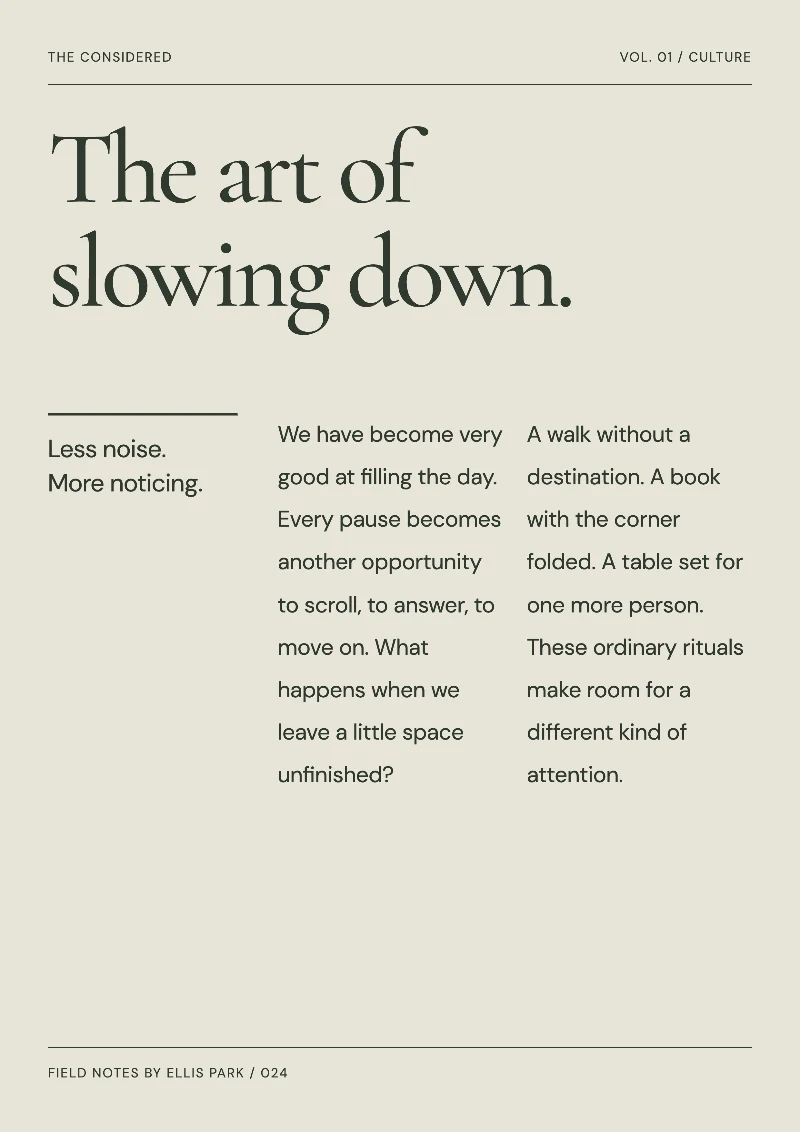
An editorial layout needs more than two typefaces. This free A4 composition uses a spanning headline as an entry point, a margin note for context and two columns for a short story. Try it for a feature, a cultural event introduction or a portfolio story page.
Edit this free layout →No purchase required. The editor uses JavaScript.
Why try this pairing?
The example pairs Cormorant Garamond’s serif strokes in the large headline with DM Sans for body copy. Check whether the title and text form a clear hierarchy, then review the space around them. Comparing isolated letters at the same size will not show how the whole page reads.
From sample to your own design
- Open the free magazine layout and replace the headline and body text. Separate paragraphs with a blank line.
- Edit the publication name, issue label, margin note and footer. Remove sample information you do not need.
- Compare typefaces and sizes within the actual composition. Check the longest paragraph, headline wraps, quotation marks and numerals first.
- Export the A4 PNG or image PDF and inspect it at actual size. Keep offline HTML if you want to edit the design later.
What to check before exporting
- This font pair is for Latin text. For Chinese articles, start with the free Chinese reading layout using Noto Serif SC and Noto Sans SC; do not rely on browser fallback fonts for mixed-script output.
- The composition is a single fixed page. Long copy does not create another page automatically. Shorten the text or adjust type size when an overflow warning appears.
- A4 PNG exports are 2480 × 3508 pixels; the PDF page is 210 × 297 mm. PDF is a flattened image, not a vector document with selectable text.
Font sources and licenses
- Cormorant Garamond · Christian Thalmann · SIL OFL 1.1
Publisher listing · Pinned source · Original license text - DM Sans · Colophon Foundry · SIL OFL 1.1
Publisher listing · Pinned source · Original license text
Commercial use depends on each original license. Font redistribution, modification and reserved names have their own conditions. A finished design and a redistributed font file are different uses; retain the relevant license when sharing font files.
Try with your own text →